I replaced a pile of device screenshots with one local report.
The script collects buyer-facing hardware details from Windows, Windows XP, and macOS. Unavailable or ambiguous values appear as Unknown or Not reported.
runtime paths
Modern Windows, Windows XP, and macOS
memory in the real report shown here
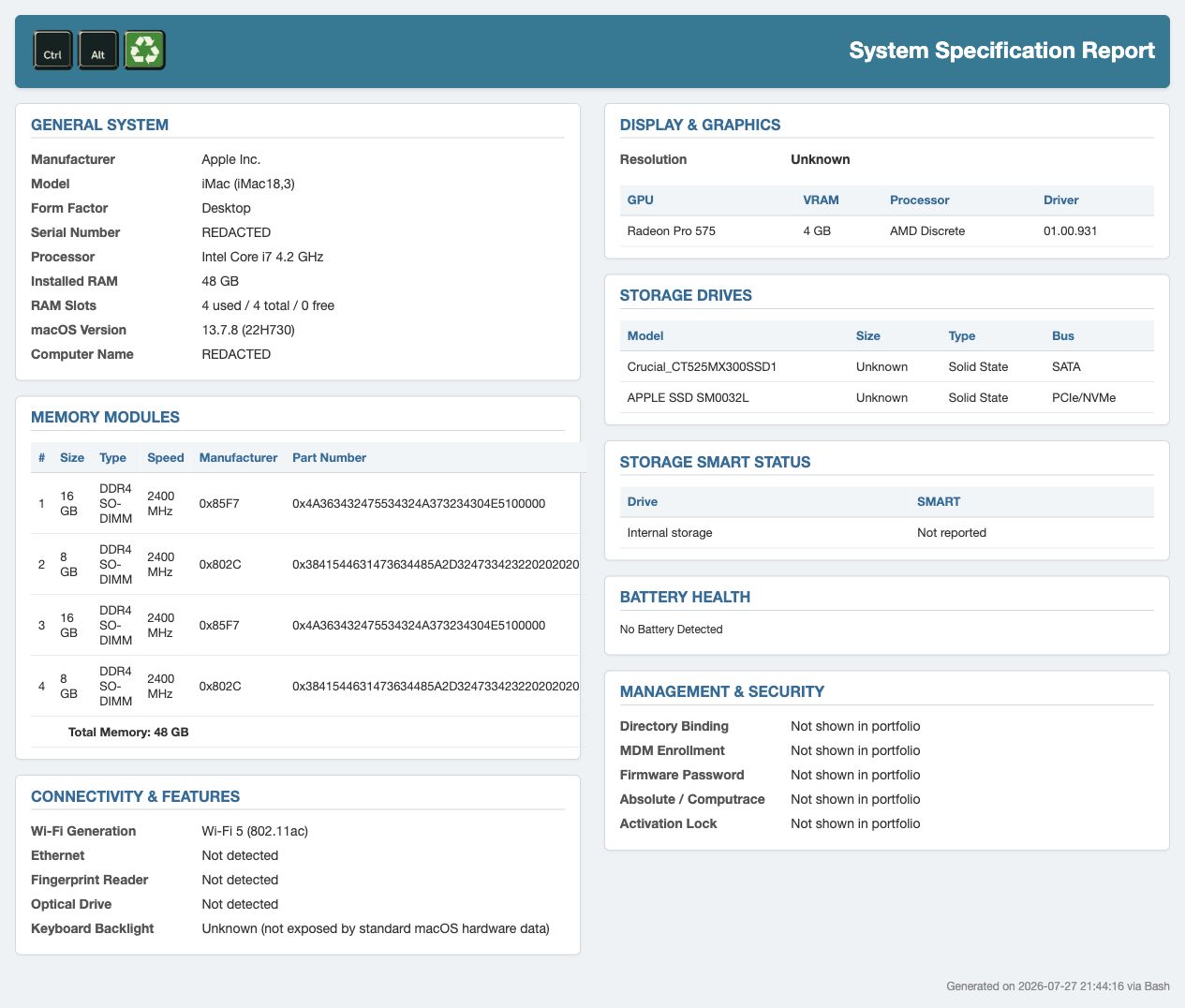
Four populated SO-DIMM slots
runtime AI calls
AI assisted development; collection is deterministic
plausible duplication found on a real machine
SMART rows were double-counted
The technician launches one file and gets one HTML report.
A buyer may care about the exact model, processor, RAM, storage, graphics, display, battery health, connectivity, and management state. By hand, a technician has to find and copy those fields one at a time.
Modern Windows uses PowerShell, CIM, WMI, registry, firmware, and networking checks. Version detection sends Windows XP to a separate VBScript collector. macOS uses local command-line tools and system reports. There is no model call at runtime.
Each path saves the report to the Desktop and opens it in the installed browser. The Mac HTML also works in Safari 5.1 on OS X Lion. Platform-specific fields keep their own sources and failure states.
Ambiguous checks are labeled Unknown, Not reported, or Not exposed.
The current report includes storage health, RAM-slot use, laptop display size and refresh rate when available, Wi-Fi generation, Ethernet status, fingerprint and optical-drive checks, battery data, and available management-state checks.
I rejected or deferred drive power-on hours, maximum supported RAM, Bluetooth version, TPM, Secure Boot, Windows 11 readiness, and webcam detection. I either could not trust the result or did not think it would help a buyer.
Unsupported and ambiguous checks use Unknown, Not reported, or Not exposed. Windows activation appears as a status; the report never collects a product key. A technician compares the report with the physical device before using it in a listing.
The first iMac run counted the same drives twice in the SMART table.
The storage table listed two physical drives while the SMART table listed four rows. Comparing it with the Mac’s own system information exposed the duplicate.
Virtual disks were leaking into the health report. Filtering them out fixed the count. The polished HTML had made the error look authoritative, which is why the physical-device check remains part of the workflow.
The fresh report above uses the corrected code. It shows the two physical storage devices once and marks the SMART result Not reported.
What remains unmeasured or unresolved.
- Field availability differs by operating-system generation and hardware vendor.
- A generated report can contain sensitive identifiers and must be reviewed before sharing.
- The report does not prove that every collected value matches the physical device.